How to block YouTube channels on guest mode / without signing in
When you browse YouTube without signing into a Google account, the three-dot menu on video cards drops its Don't recommend channel option. If you want to hide a creator while browsing logged out, using a guest computer profile, or in an incognito window, you can add them to Intentional YT's local Channel Blocklist. It filters channels directly in your browser without requiring a login.
I'm Manas, the developer of Intentional YT. Here's how to set up local channel blocking in desktop Chrome, Firefox, or Edge, and how it differs from YouTube's built-in button.
Why "Don't recommend channel" disappears when logged out
YouTube stores recommendation preferences on Google's servers. When you click Don't recommend channel while signed in, YouTube attaches that choice to your Google account.
If you aren't logged in, YouTube has nowhere to save that preference. That happens whenever you browse signed out, use a shared work or family computer on a guest profile, or open YouTube in an Incognito or Private window.
Even when you are signed in, YouTube's native setting only affects the home feed and sidebar suggestions. It never hides matching channels from search results.
How Intentional YT blocks channels locally
Intentional YT saves your blocklist in local browser storage (chrome.storage.local or browser.storage.local in Firefox). When a YouTube page loads, the extension checks each video card against your list and hides matching channels before they appear.
Because the list stays on your machine, you don't need a Google account. The list is never sent to external servers, and the filter catches matching channels in search results as well as your home feed and sidebar suggestions.
Block channels without signing in
- Install Intentional YT in your desktop browser, then open YouTube.
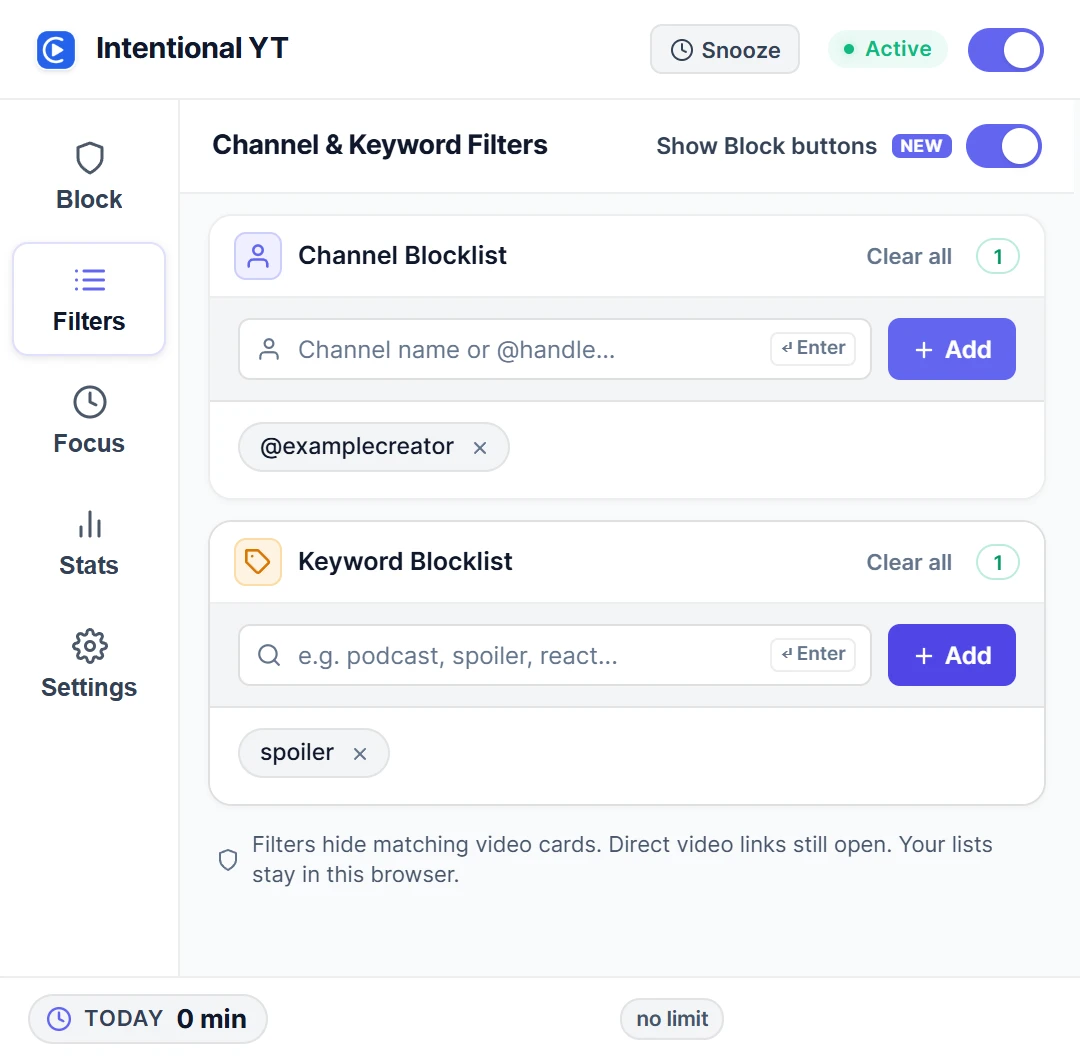
- Open the extension popup from your toolbar and select Filters.
- Under Channel Blocklist, type the creator's
@handle(like@examplecreator), channel name, or channel link. - Press Enter or select Add.
If you browse mainly in private windows, give the extension permission to run there:
- In Chrome, Edge, or Brave: open
chrome://extensions, click Details under Intentional YT, and turn on Allow in Incognito. - In Firefox: open
about:addons, click Intentional YT, and set Run in Private Windows to Allow.
Using the on-page Block button
You can also block channels directly from video cards without opening the popup each time.
In the Filters tab, turn on Show Block buttons. A small Block button will appear next to creator names on YouTube cards. Clicking it hides the channel immediately. If you click by mistake, an Undo notice appears for a few seconds.
Local blocklist vs. YouTube's native setting
| Feature | YouTube's "Don't recommend" | Intentional YT local blocklist |
|---|---|---|
| Google account needed | Yes | No |
| Works logged out or in Guest Mode | No | Yes |
| Works in Incognito or Private windows | No | Yes (with private window permission) |
| Hides videos in search results | No | Yes |
| Data location | Google servers | Local browser storage |
| How to unblock | Account activity settings | Click the × next to any entry in Filters |
Tips for accurate blocking
Whenever possible, use the creator's exact @handle (like @creatorname from their channel URL). Multiple channels can share the same display name, so handles ensure you hide the right one.
Capital letters don't matter: @ExampleCreator matches @examplecreator.
To unblock a creator at any point, reopen Filters and click the × button next to their name in the list.
Hide topics with keywords
To filter out an entire subject instead of an individual creator, add words to the Keyword Blocklist under Filters. Adding terms like spoiler or reaction hides video cards with those words in the title or visible description snippet. For phrase matching details and word-boundary rules, see the keyword-filtering guide.
Frequently asked questions
Will clearing my browser history delete my blocklist?
Clearing standard browsing history and cache leaves extension storage intact. However, clearing all extension data, deleting your entire browser profile, or uninstalling the extension will remove your saved lists.
Does this block channels in the YouTube phone app?
No. Intentional YT only runs in desktop browsers. It cannot change what the YouTube mobile app displays.
Why is a blocked channel still showing up?
If a channel you added still appears:
- Make sure the main extension toggle is turned on.
- In Incognito or Private windows, confirm that the extension has permission to run in private mode.
- Check that you entered a channel handle, name, or channel URL instead of an individual video link (
watch?v=...). - If you recently snoozed protections, open the popup and click Resume Now.
For search-specific filtering details, read how to block YouTube channels from search results. To pause playback after a daily budget, see how to set a daily YouTube time limit.

Try Intentional YT
Set a daily watch limit, hide distracting feeds, or use Focus Lock to add a cooldown before changing your settings. Your settings and watch-time counters stay in your browser, with no extension telemetry.