How to set a daily YouTube watch limit
If you'd like YouTube to pause after a set amount of watching, open Intentional YT, go to Focus, and turn on Daily limit. Choose your daily minutes. Once you've used them, the extension pauses playback.
I'm Manas, the developer. The limit applies to YouTube in your desktop browser. It won't stop playback in the phone app or set a limit across all your devices.
How to set a daily YouTube time limit
- Install Intentional YT for your browser and open YouTube.
- Open the extension popup and select Focus.
- Under Watch time & limits, switch on Daily limit.
- Choose 15, 30, 45, 60, 90, or 120 minutes. Choose Custom for another budget between 1 and 1,440 minutes.
- Check the watch-time status in the popup to see your tracked time and configured limit.
Pick a budget that fits what you plan to watch. A 45-minute limit might suit a few tutorials, but it'll interrupt a longer lecture. You can adjust it before you start.
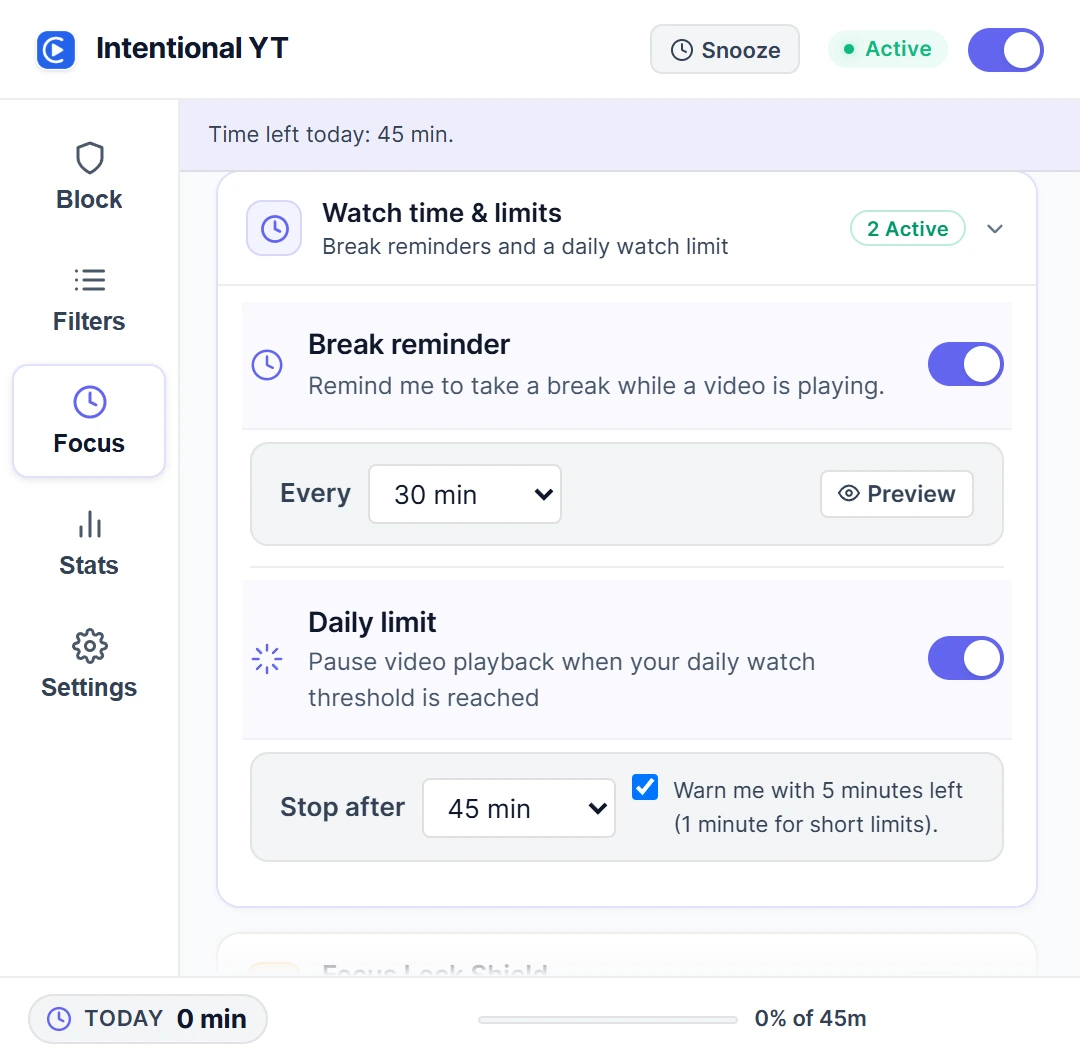
The two controls in this screenshot do different jobs. Break reminder nudges you to take a break; Daily limit actually pauses the video. If you want playback to stop, make sure you've enabled the daily limit.
What does the timer count?
The timer runs while a YouTube video plays. You can leave a paused tab open without using up your minutes. It resets at midnight, and both your settings and watch time stay in your browser. Another browser profile or device has its own separate budget.
You can still disable or uninstall the extension through your browser. The limit gives you a stopping point, but it can't force you to keep it enabled.
Playback speed and multiple tabs
The budget measures time spent playing, rather than the video's full running time. A 20-minute video watched at 2× speed uses about 10 minutes of your budget, assuming uninterrupted playback. Jumping forward in the video does not spend the skipped minutes. Buffering and detected YouTube ad playback are excluded.
Playback from multiple tabs is added together. Two videos playing for five minutes each can use about ten minutes of your daily budget, even if they play at the same time. Pause other YouTube tabs when checking the timer or trying to stay within a budget.
What happens when the limit is reached?
The player pauses and shows Daily Limit Reached. Choose Stop Watching (Go Home) to leave the watch page. For an eligible video already in progress, the overlay may offer Finish this video; that option is not always available, including for live streams.
When Focus Lock is off, Dismiss for today lets you keep watching for the rest of the day. If you'd prefer a delay before changing protected settings, set up Focus Lock before you start watching.
Daily limits, reminders, and schedules are different
| Control | Purpose |
|---|---|
| Daily limit | Pause playback when the daily watch budget is reached |
| Break reminders | Prompt you to take a break during watching |
| Scheduled blocking | Apply blocking rules during selected days and hours |
| Focus Lock | Add a PIN and cooldown before changing protected settings |
Use a scheduled blocking rule for something that happens at the same time each week, like an afternoon study session. Use a daily budget when the total minutes matter more than the time of day. You can use both together.
Try a short test first
- Check how much watch time the popup already shows today. The daily limit includes earlier viewing; changing the limit does not start a fresh session timer.
- Pause other YouTube tabs. Set a custom budget one or two whole minutes above today's displayed watch time, and play a regular video.
- Check that the counter advances. Continue until playback pauses and the limit overlay appears.
- Set your intended daily budget after the check. The time spent testing still counts toward today's total.
Do this before turning on Focus Lock so you can easily raise the limit afterward. If you've already dismissed today's limit, wait until the daily reset to test it.
| What happens | What to check |
|---|---|
| The video pauses immediately | Today's accumulated watch time may already exceed the budget you selected |
| The counter does not advance | Confirm the video is playing rather than paused, buffering, or showing an ad; check the main switch and reload after an extension update |
| Watch time rises faster than expected | Pause any other YouTube tabs that are also playing |
| Playback continues beyond the budget | Check that Daily limit is on, protections are not snoozed, and you have not dismissed today's limit or chosen Finish this video |
| The budget differs in another browser | Settings and counters belong to each browser profile; configure the other profile separately |
If it does not work as described, send feedback with your browser, extension version, and the steps that led to the problem.
Reduce the temptation to start another video
A watch limit won't remove the suggestions beside your video. If those keep tempting you into another one, you can hide Shorts and recommendations while keeping search and subscriptions. The privacy policy explains what stays in local storage.
The homepage demo lets you explore the controls and has the download links for each browser.

Try Intentional YT
Set a daily watch limit, hide distracting feeds, or use Focus Lock to add a cooldown before changing your settings. Your settings and watch-time counters stay in your browser, with no extension telemetry.