Enhancer for YouTube + Unhook in one extension: declutter and speed up YouTube
A lot of desktop YouTube setups end up looking like a stack of separate browser extensions. You install Enhancer for YouTube so the video player fills your screen without entering full-screen mode. Then you install Unhook or DF Tube because the home feed and Shorts keep pulling your attention away from what you sat down to watch. If you also run an ad blocker and SponsorBlock, Chrome or Firefox is running four separate extensions on every single video page.
I am Manas, the developer of Intentional YT. In this guide, I will explain why stacking multiple YouTube extensions leads to browser lag and layout flicker, and how you can get player resizing, feed hiding, and study controls in a single lightweight extension.
Why running multiple extensions slows down YouTube
YouTube is not a collection of static web pages. It is a complex single-page application built on Google's Polymer framework. When you click a video, the browser does not load a new page from scratch. Instead, internal scripts swap out the video element, inject new recommendation rows, and update the player container dynamically.
Every extension you install for YouTube inserts its own content scripts into that environment. When you stack Enhancer for YouTube with a feed blocker like Unhook, two technical problems usually show up.
1. Competing DOM listeners and layout shifts
Enhancer for YouTube modifies the player container, adjusts control bars, and resizes elements when you switch modes. Feed blockers like Unhook watch the page to hide recommendation grids, comments, and sidebars.
Both extensions often register MutationObserver callbacks that listen for DOM changes. When YouTube's scripts insert a new container, Extension A mutates the DOM to hide a feed item. That change triggers Extension B's observer, which recalculates player dimensions or adjusts wrapper heights. In heavy sessions, this back-and-forth observer loop causes layout shifts, dropped video frames, and visible page jitter during the first two seconds of playback.
2. Memory overhead and script collisions
Each browser extension runs isolated content scripts and background service workers. If three extensions each keep an open port to their background workers, listen for tab navigation events, and inject their own stylesheets, your browser consumes additional memory for each tab. When YouTube updates its internal CSS classes (which happens every few months), separate extensions can break in different ways or conflict with each other's fallback rules.
What you actually need from both extensions
Most people who run both tools only use a small subset of the features:
- From Enhancer: expanding the player size (theater mode that fills the browser width) and cleaner player layout.
- From Unhook: hiding the home feed, removing Shorts shelves, hiding sidebar recommendations, and blocking comments.
Running a large tool with dozens of menus just to expand the player alongside a separate extension just to hide feeds is unnecessary overhead.
How Intentional YT combines both workflows
When I built Intentional YT, the goal was to replace that multi-extension stack with a clean, native approach built on two engineering rules: zero npm dependencies and zero-flash CSS injection.
1. Expand player without heavy scripts
Under the Player section in Intentional YT, you can turn on Expand player. This applies CSS rules that widen the standard video player to fill the available browser window, similar to theater mode in Enhancer for YouTube, without running background audio compressors or heavy custom control toolbars.
2. Zero-flash feed and Shorts blocking
Instead of waiting for YouTube's JavaScript to finish rendering and then deleting elements with a script, Intentional YT injects high-specificity CSS at document_start. The home feed, Shorts shelves, sidebar suggestions, and end screens are hidden before the browser paints them to the screen. You do not see the home feed flash for half a second before disappearing.
3. Features neither Enhancer nor Unhook provide
Combining feed hiding and player expansion solves the layout problem, but intentional watching usually requires more than just hiding elements:
- 15-video feed limit: If a completely blank homepage feels too extreme, you can cap your home feed to 15 videos instead of infinite scroll.
- Channel blocklists: Block specific channels from showing up in your search results and recommendation feeds, even in guest windows.
- Daily watch budgets: Set a daily time limit (for example, 45 minutes). When your time is up, the video pauses.
- Focus Lock: Add a PIN and a mandatory cooldown timer so you cannot impulsively turn your filters off when your willpower dips.
How to set up a unified YouTube layout
If you want to replace multiple extensions with a single tool, here is the setup:
- Install Intentional YT for Chrome, Edge, or Firefox.
- Disable or remove duplicate extensions like Unhook or extra feed-hiding scripts to prevent style collisions. You can keep specialized single-purpose tools like uBlock Origin.
- Click the Intentional YT puzzle icon in your browser toolbar to open the popup.
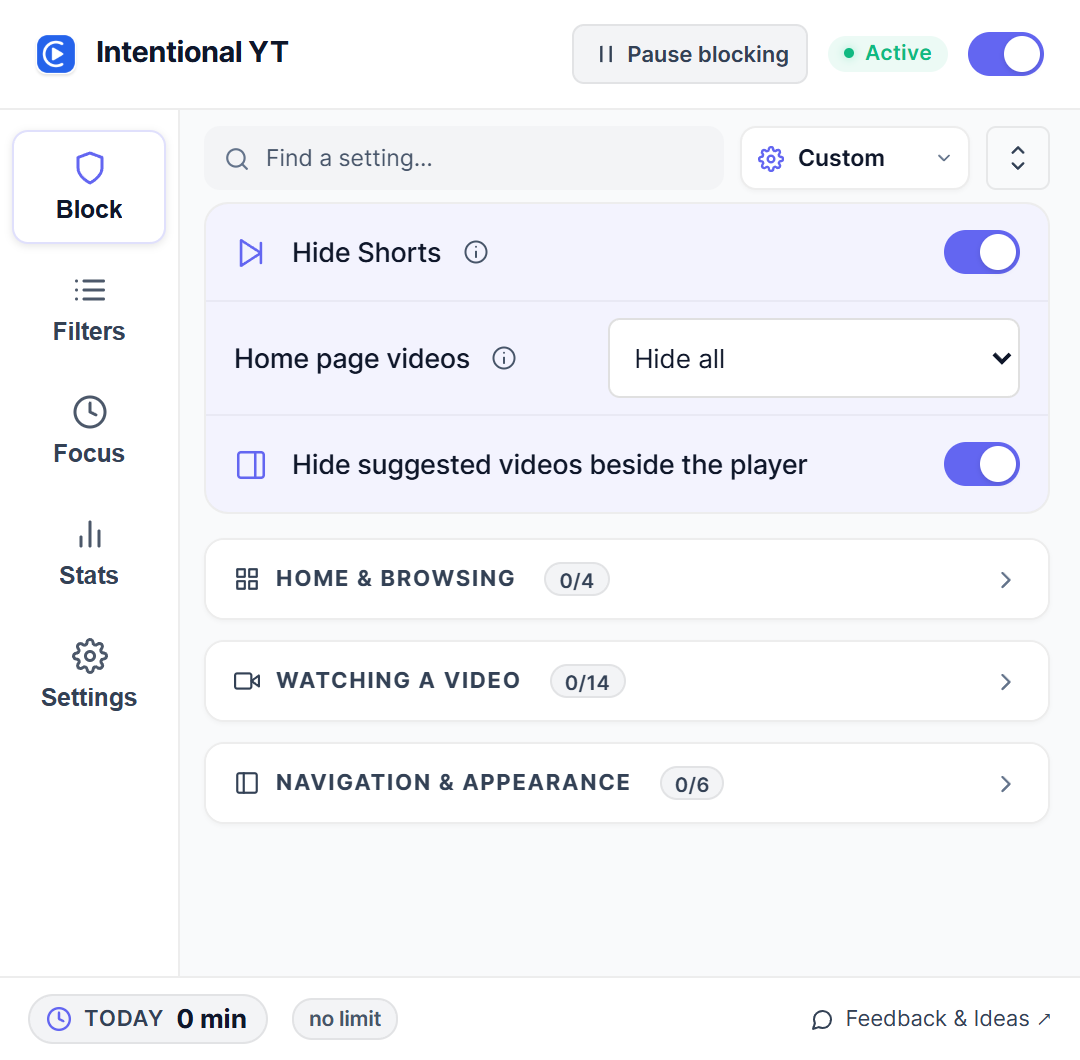
- Under Feeds, turn on Hide Shorts and choose your preferred Home page videos setting (either Hide all or Limit to 15 videos).
- Turn on Hide suggested videos beside player to clear the right-hand sidebar during video playback.
- Under Player, turn on Expand player to get the wide theater layout automatically on every video.
Popup Quick Setup:
├── Feeds
│   ├── Home page videos: Hide all (or Limit 15)
│   ├── Hide Shorts: ON
│   └── Hide suggested videos beside player: ON
└── Player
    └── Expand player: ON
Testing your browser performance
After turning off duplicate extensions, open YouTube and test a few pages. Video pages should load smoothly without the sidebar jumping around or elements popping into view after the video begins. Because Intentional YT runs entirely on your local machine with zero external network tracking, your browsing data stays private and your browser stays responsive.

Try Intentional YT
Set a daily watch limit, hide distracting feeds, or use Focus Lock to add a cooldown before changing your settings. Your settings and watch-time counters stay in your browser, with no extension telemetry.